
Edit sections/main-cart-items.liquid for B2B Cart Pricing
This guide explains how to update the sections/main-cart-items.liquid file to enable dynamic B2B pricing in the cart.
By wrapping cart price elements in custom <span> tags, JavaScript can dynamically adjust prices based on quantity breaks or custom rules.
Step 1: Access the Code Editor
- In your Shopify admin, go to Online Store under Sales Channels.
- Click Customize for your current theme.
- In the top-left corner, click the ⋮ (three dots) and choose Edit Code.
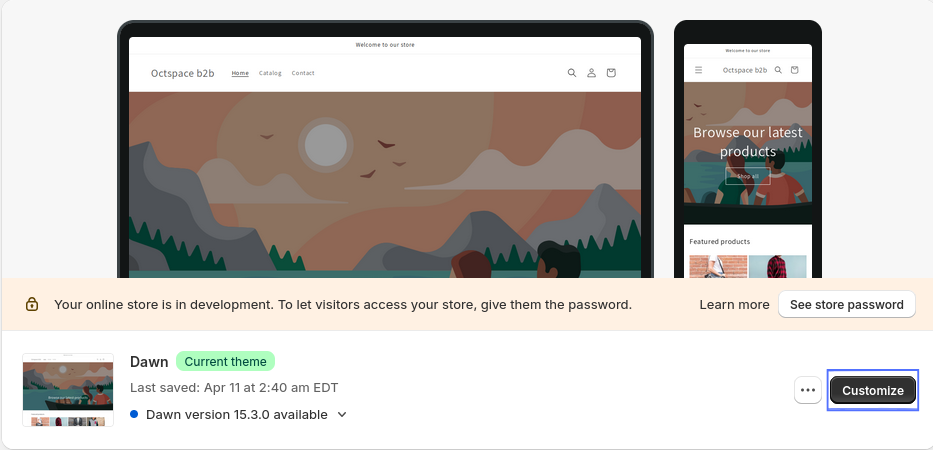

Step 2: Edit sections/main-cart-items.liquid
- In the left sidebar, open the Sections folder.
- Find and click the file named main-cart-items.liquid.
Step 3: Update Cart Price Markup
Locate this condition block in the file:
{%- if item.original_line_price != item.final_line_price -%}
Replace the contents inside the condition with the following code:
{%- if item.original_line_price != item.final_line_price -%}
  <dl class="cart-item__discounted-prices">
    <dt class="visually-hidden">
      <span class='oct-b2b-price'>{{ 'products.product.price.regular_price' | t }}</span>
    </dt>
    <dd>
      <s class="cart-item__old-price price price--end">
        <span class='oct-b2b-price-total' data-item-total-id="{{ item.product.id }}">{{ item.original_line_price | money }}</span>
      </s>
    </dd>
    <dt class="visually-hidden">
      <span class='oct-b2b-price'>{{ 'products.product.price.sale_price' | t }}</span>
    </dt>
    <dd class="price price--end">
      <span class='oct-b2b-price' oct-b2b-final-line-price>{{ item.final_line_price | money }}</span>
    </dd>
  </dl>
{%- else -%}
  <span class="price price--end">
    <span class='oct-b2b-price-total' data-item-total-id="{{ item.product.id }}">{{ item.original_line_price | money }}</span>
  </span>
{%- endif -%}
Next, update the unit price display by locating this block:
{%- if item.variant.available and item.unit_price_measurement -%}
Replace the contents with the following:
{%- if item.variant.available and item.unit_price_measurement -%}
  <div class="unit-price caption">
    <span class="visually-hidden"><span class='oct-b2b-price'>{{ 'products.product.price.unit_price' | t }}</span></span>
    <span class='oct-b2b-price' oct-b2b-unit-price>{{ item.unit_price | money }}</span>
    <span aria-hidden="true">/</span>
    <span class="visually-hidden"> {{ 'accessibility.unit_price_separator' | t }} </span>
    {%- if item.unit_price_measurement.reference_value != 1 -%}
      <span class='oct-b2b-price' oct-b2b-unit-price-measurement>{{- item.unit_price_measurement.reference_value -}}</span>
    {%- endif -%}
    <span class='oct-b2b-price' oct-b2b-unit-price-measurement>{{ item.unit_price_measurement.reference_unit }}</span>
  </div>
{%- endif -%}
Step 4: Save the File
Once the changes are complete, click Save in the top-right corner to apply your updates. These changes will now support dynamic B2B pricing logic in your cart display.